Transaction Panel Design
Transaction Panel Design
Transaction Panel Design
Seamless transactions at your fingertips with a thoughtful menu design
Seamless transactions at your fingertips with a thoughtful menu design
Project Background
Project Background
Project Background
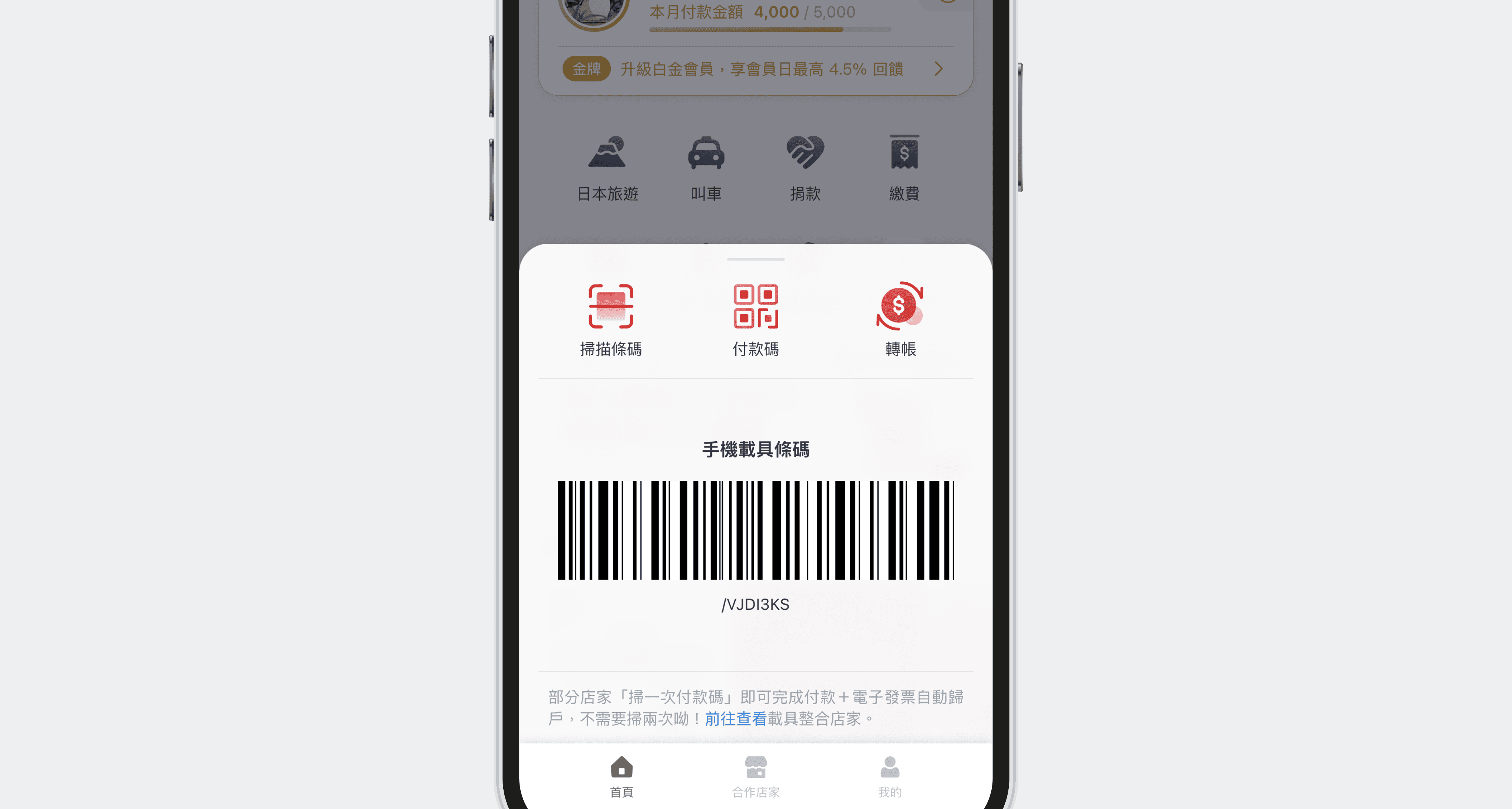
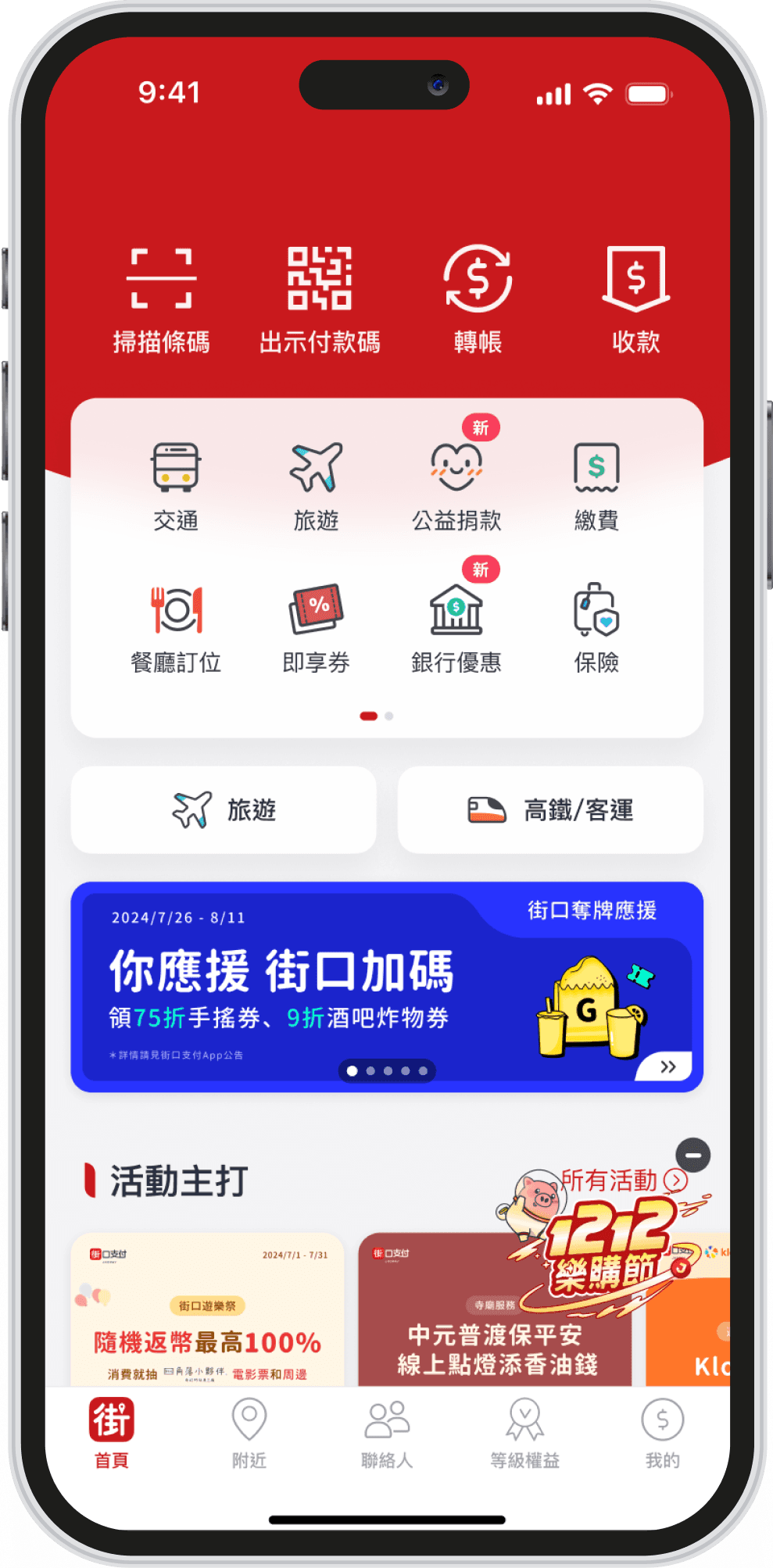
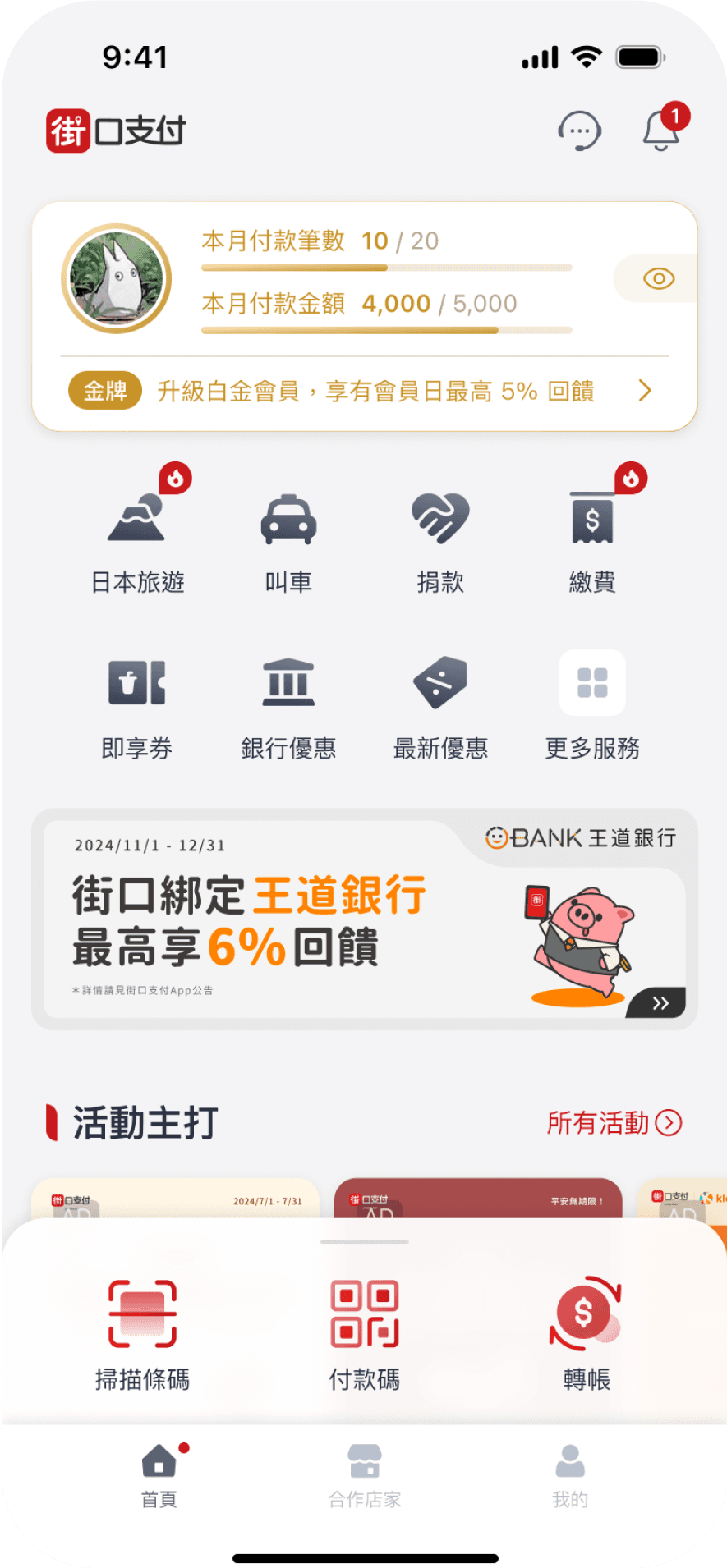
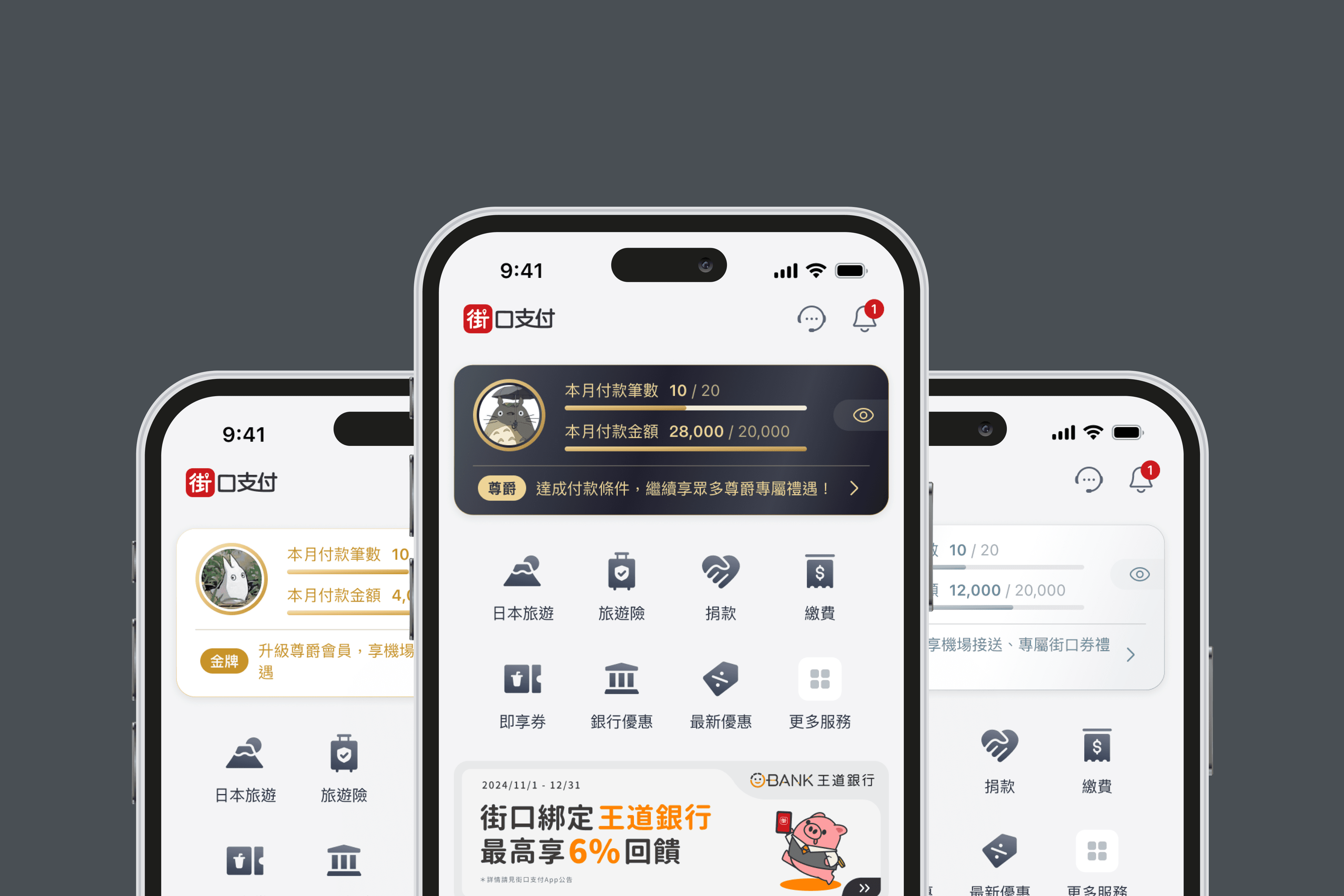
A key business goal of this homepage redesign was to drive transaction frequency and volume by elevating the visibility of the membership tier system. But giving membership benefits the spotlight meant taking over the homepage's prime visual space, which directly displacing the three core transaction functions previously placed at the top: Transfer, Pay, and Scan.The challenge is to yield the homepage's prime placement to membership without sacrificing the exposure or usage of core transactions.
A key business goal of this homepage redesign was to drive transaction frequency and volume by elevating the visibility of the membership tier system. But giving membership benefits the spotlight meant taking over the homepage's prime visual space, which directly displacing the three core transaction functions previously placed at the top: Transfer, Pay, and Scan.The challenge is to yield the homepage's prime placement to membership without sacrificing the exposure or usage of core transactions.
Problem
Problem
Problem
Usability & Onboarding
Usability & Onboarding
How can we help users quickly understand and adapt to the new panel?
How can we help users quickly understand and adapt to the new panel?
How can the panel support diverse payment scenarios to improve efficiency?
How can the panel support diverse payment scenarios to improve efficiency?
Constraints & Challenges
Constraints & Challenges
Constraints & Challenges
Interaction Logic
Interaction Logic
Defining clear expansion behavior across different usage contexts
Defining clear expansion behavior across different usage contexts
Visual Consistency
Visual Consistency
Making the panel stand out while maintaining home screen balance and brand coherence
Making the panel stand out while maintaining home screen balance and brand coherence
Before
After
Design Goals
Design Goals
Spatial strategy
Spatial strategy
How can moving core functions downward become an efficiency gain rather than a loss?
How can moving core functions downward become an efficiency gain rather than a loss?
How can moving core functions downward become an efficiency gain rather than a loss?
How can moving core functions downward become an efficiency gain rather than a loss?
Learning cost
Learning cost
How can the new bottom-panel pattern override existing muscle memory without friction?
How can the new bottom-panel pattern override existing muscle memory without friction?
How can the new bottom-panel pattern override existing muscle memory without friction?
Visual weight
Visual weight
How can the panel hold its presence without competing with the membership card?
How can the panel hold its presence without competing with the membership card?
Design Process
Design Process
Design Process
UX Interaction Design
UX Interaction Design
Problem
Problem
Copying LINE Pay feels safe but invites the "why the same as competitors" critique. Differentiating risks higher learning cost and lower task completion.
Copying LINE Pay feels safe but invites the "why the same as competitors" critique. Differentiating risks higher learning cost and lower task completion.
Approach
Approach
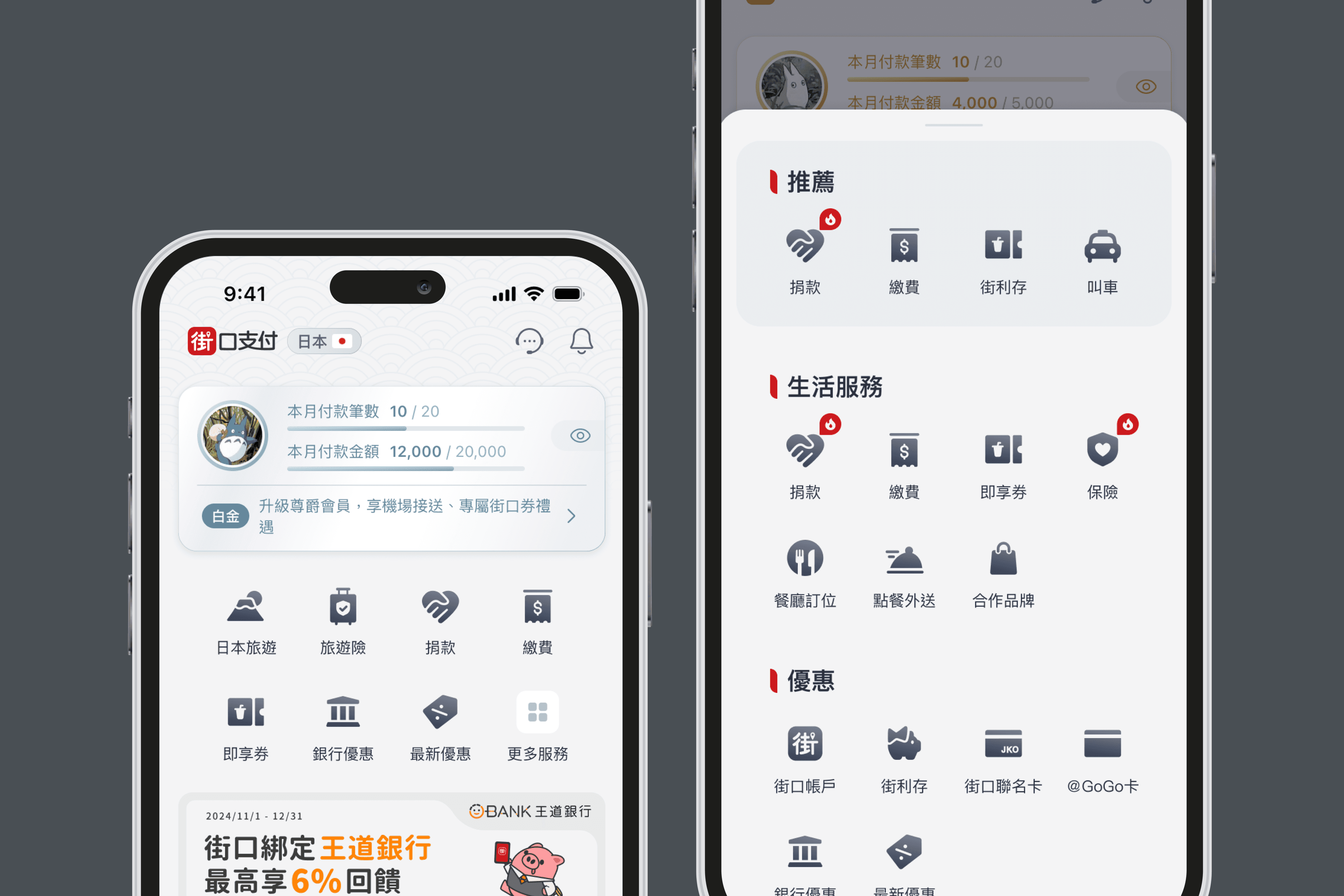
The panel exists to shorten task time. I kept the familiar swipe-to-expand to minimize learning cost, and pushed differentiation into a three-tier height system that adapts to the user's context.
The panel exists to shorten task time. I kept the familiar swipe-to-expand to minimize learning cost, and pushed differentiation into a three-tier height system that adapts to the user's context.
UI Visual Design
UI Visual Design
Problem
Problem
Solid brand red maximizes the panel's weight but unbalances the homepage.Dropping red entirely weakens the panel's brand identity and signals lower functional importance.
Solid brand red maximizes the panel's weight but unbalances the homepage.Dropping red entirely weakens the panel's brand identity and signals lower functional importance.
Approach
Approach
Red for brand identity, gradient to soften its pressure, frosted glass for transparency and to echo the icon gradients above. The panel holds brand presence while blending into the homepage system.
Red for brand identity, gradient to soften its pressure, frosted glass for transparency and to echo the icon gradients above. The panel holds brand presence while blending into the homepage system.

Usability Testing
Usability Testing
To validate whether the new Transaction Panel improves efficiency and intuitiveness, I designed task-based tests to observe user behavior in real scenarios
To validate whether the new Transaction Panel improves efficiency and intuitiveness, I designed task-based tests to observe user behavior in real scenarios
1
1
Transaction Discoverability
Transaction Discoverability
Find and complete a transfer from the home screen
Find and complete a transfer from the home screen
2
2
Event-Driven Payment
Event-Driven Payment
Locate the "Member Day" promotion and complete a payment
Locate the "Member Day" promotion and complete a payment
3
3
Barcode Usability
Barcode Usability
Access and present the mobile barcode from the home screen
Access and present the mobile barcode from the home screen
Testing Method
Testing Method
Method
Method
Task-based usability testing
Task-based usability testing
Interviewers
Interviewers
5 people
5 people
Evaluation Metrics
Evaluation Metrics
Task completion success
Task completion success
Smoothness of interaction; any confusion or navigation issues
Smoothness of interaction; any confusion or navigation issues
Key Insights
Key Insights
High Discoverability of Key Functions
High Discoverability of Key Functions
All participants can quickly identify key actions upon landing on the home screen.
All participants can quickly identify key actions upon landing on the home screen.
Smooth panel interaction
Smooth panel interaction
Users found the auto-collapse on scroll helpful for a cleaner, more focused experience.
Users found the auto-collapse on scroll helpful for a cleaner, more focused experience.
Barcode feature lacked visibility
Barcode feature lacked visibility
60% of users failed to find the barcode feature due to unawareness of the swipe-up panel interaction.
60% of users failed to find the barcode feature due to unawareness of the swipe-up panel interaction.
Lack of clear swipe-up cues and interaction guidance.
Lack of clear swipe-up cues and interaction guidance.
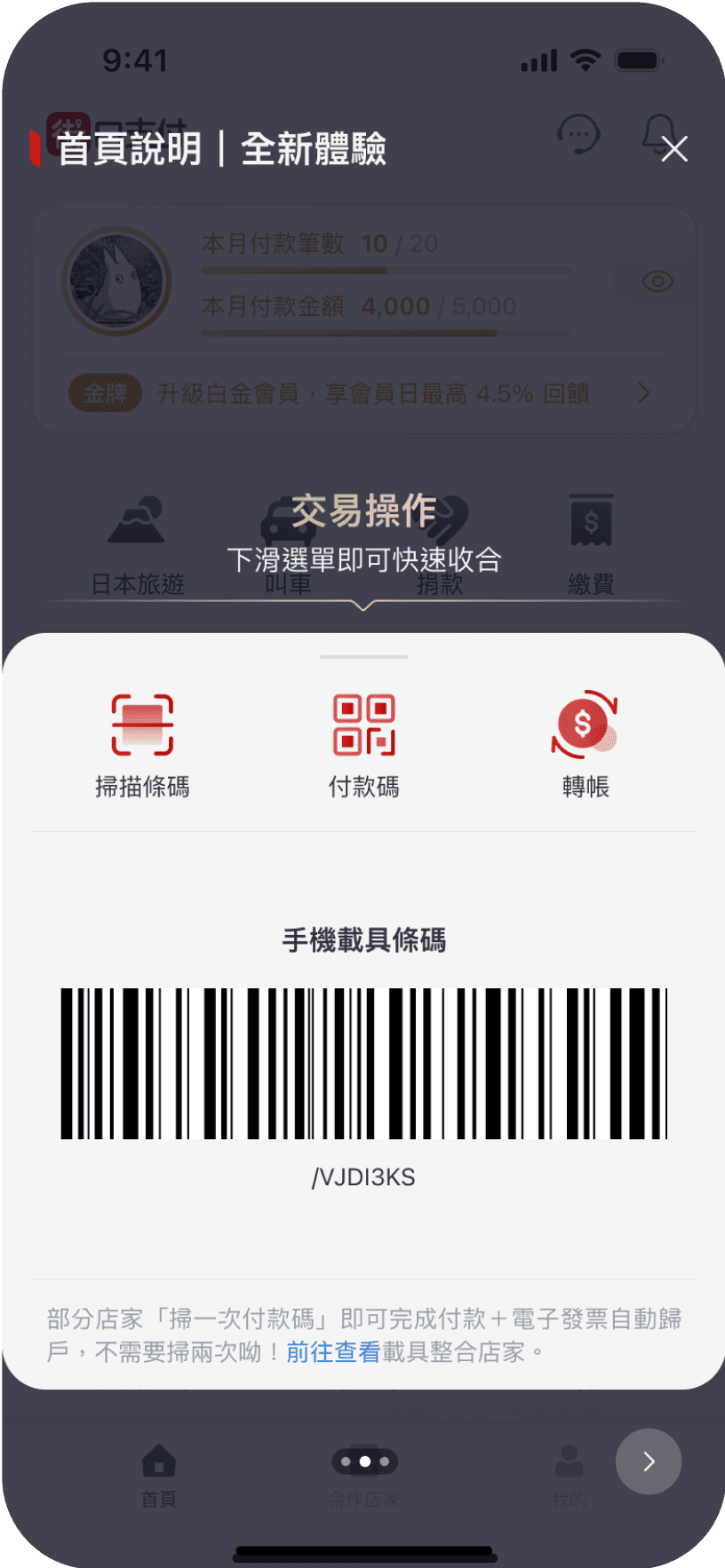
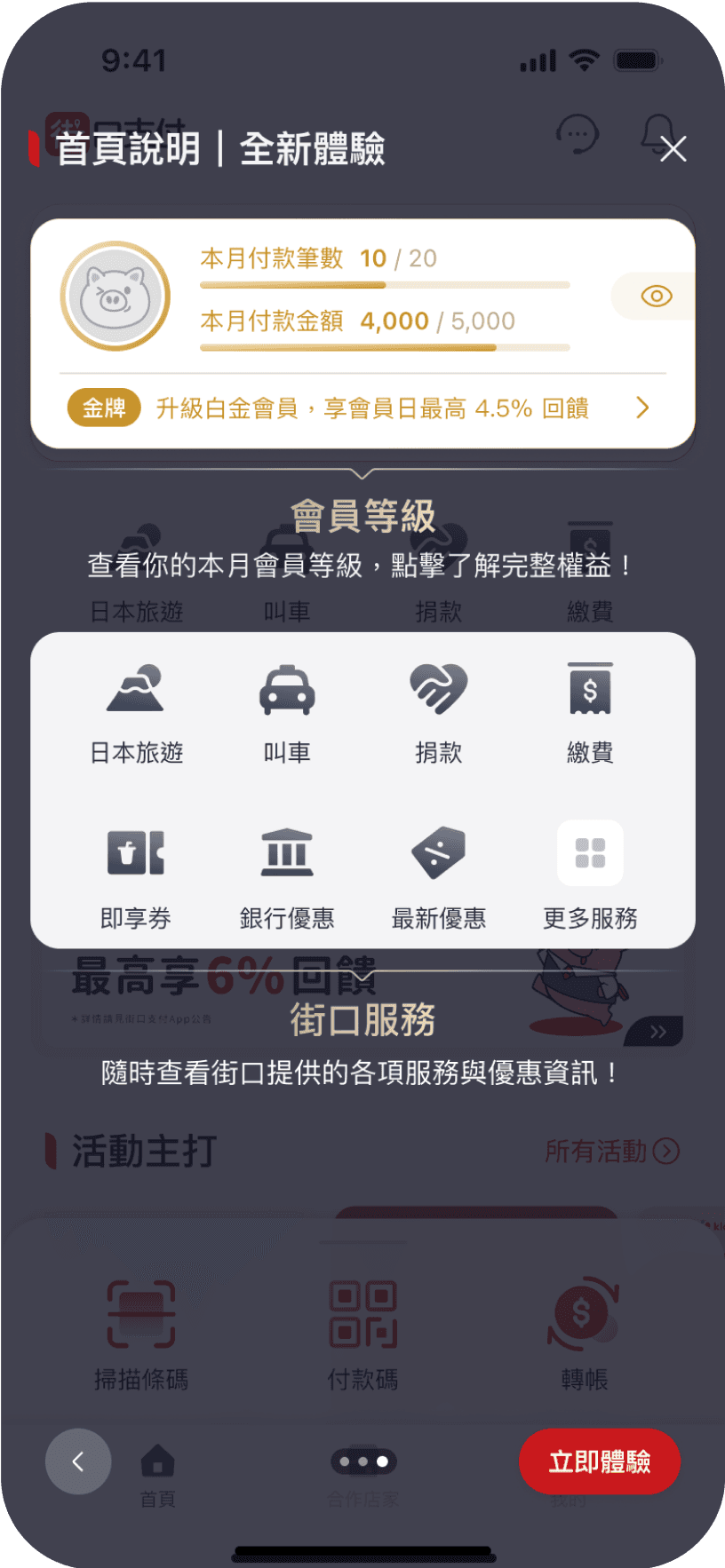
Enhanced Onboarding Design
Enhanced Onboarding Design
Onboarding Design
Onboarding Design
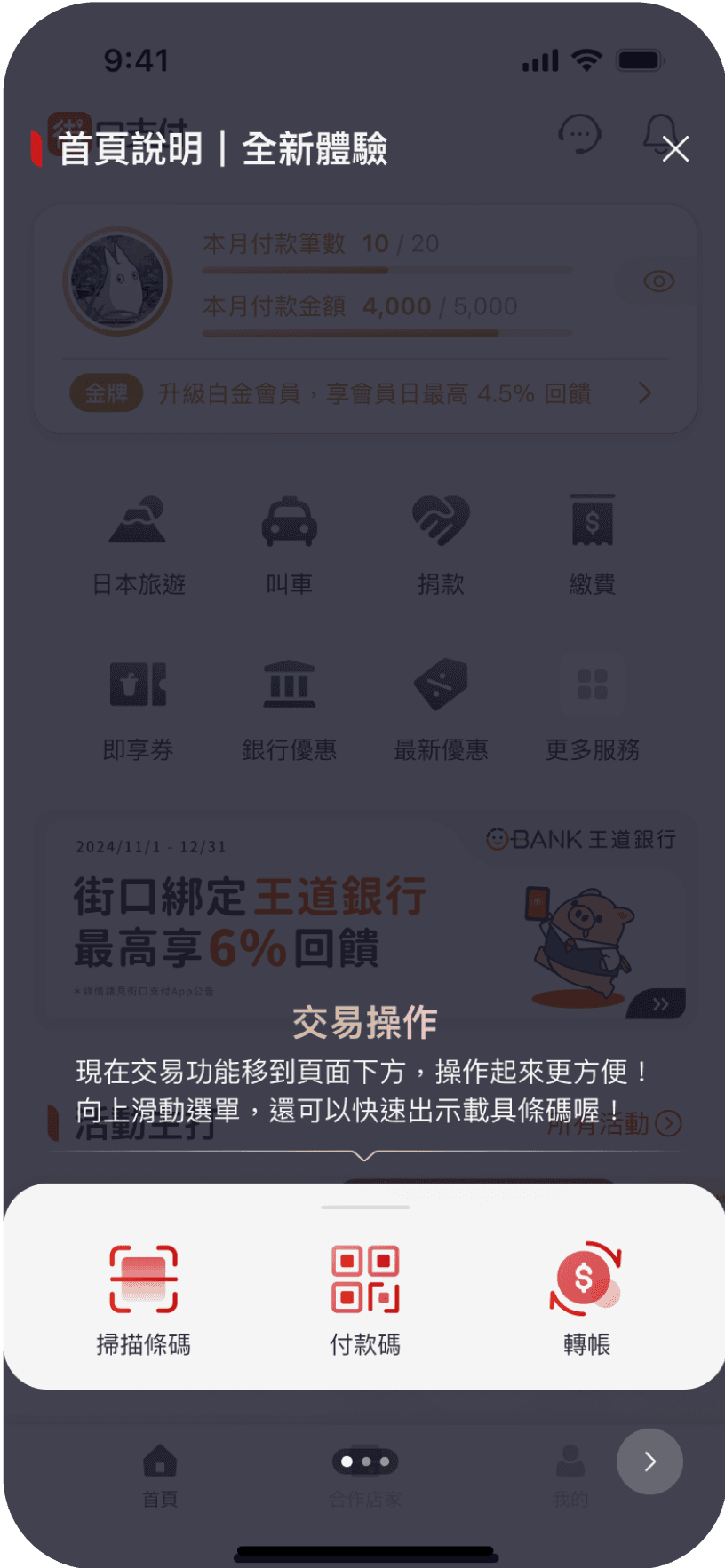
Testing showed 60% of users didn't realize the carrier barcode was inside the panel.
Testing showed 60% of users didn't realize the carrier barcode was inside the panel.
I saw this as a temporary cognitive gap from the IA restructure, in which users need time to rebuild their mental model
I saw this as a temporary cognitive gap from the IA restructure, in which users need time to rebuild their mental model
I solved this with onboarding instead of restructuring. The panel's primary functions are payment, transfer, and scan,the carrier barcode is just a power-user shortcut, not worth reworking the entry point for temporary unfamiliarity. Onboarding is a low-cost transitional fix, to be validated with post-launch data.
I solved this with onboarding instead of restructuring. The panel's primary functions are payment, transfer, and scan,the carrier barcode is just a power-user shortcut, not worth reworking the entry point for temporary unfamiliarity. Onboarding is a low-cost transitional fix, to be validated with post-launch data.
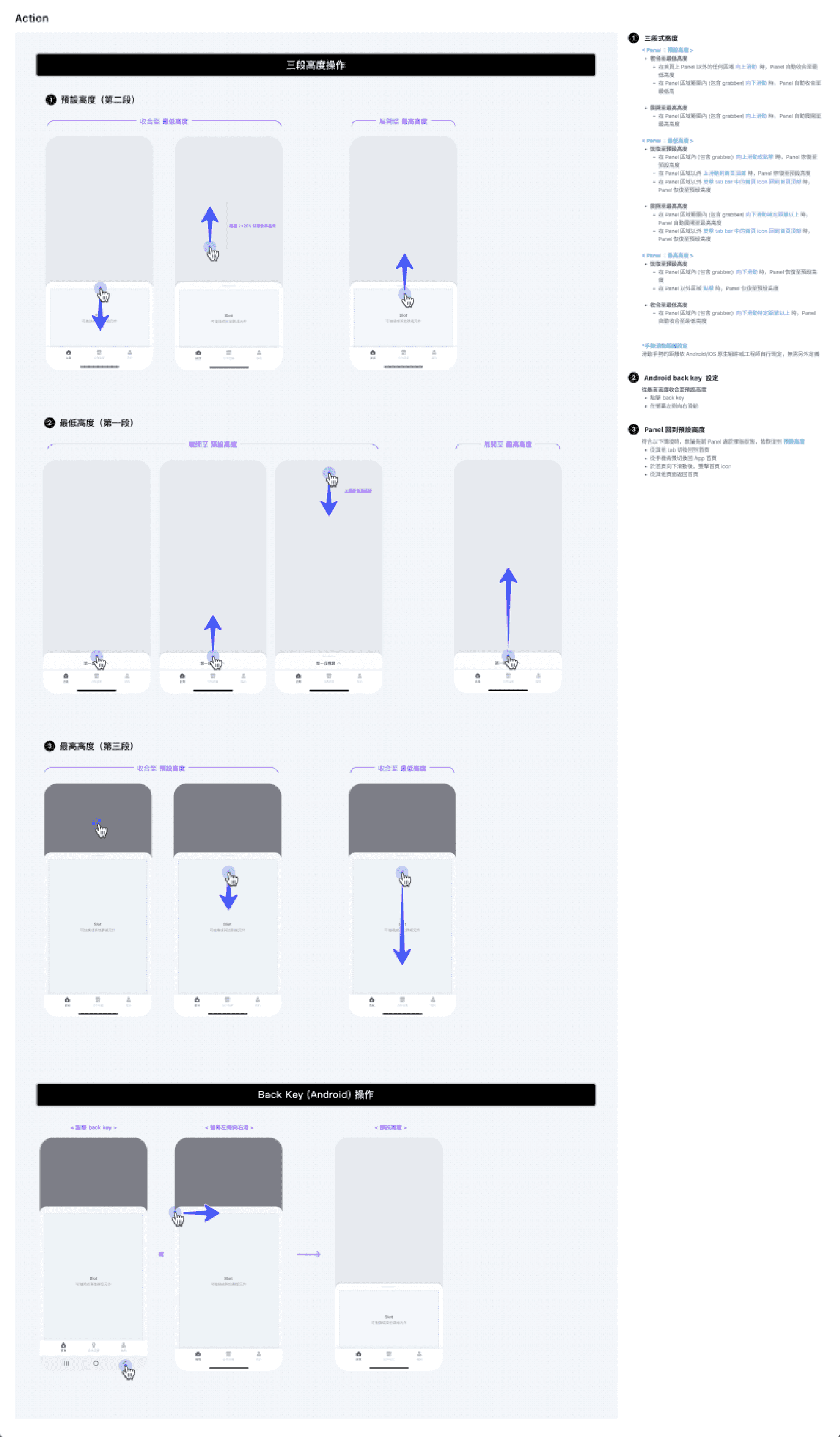
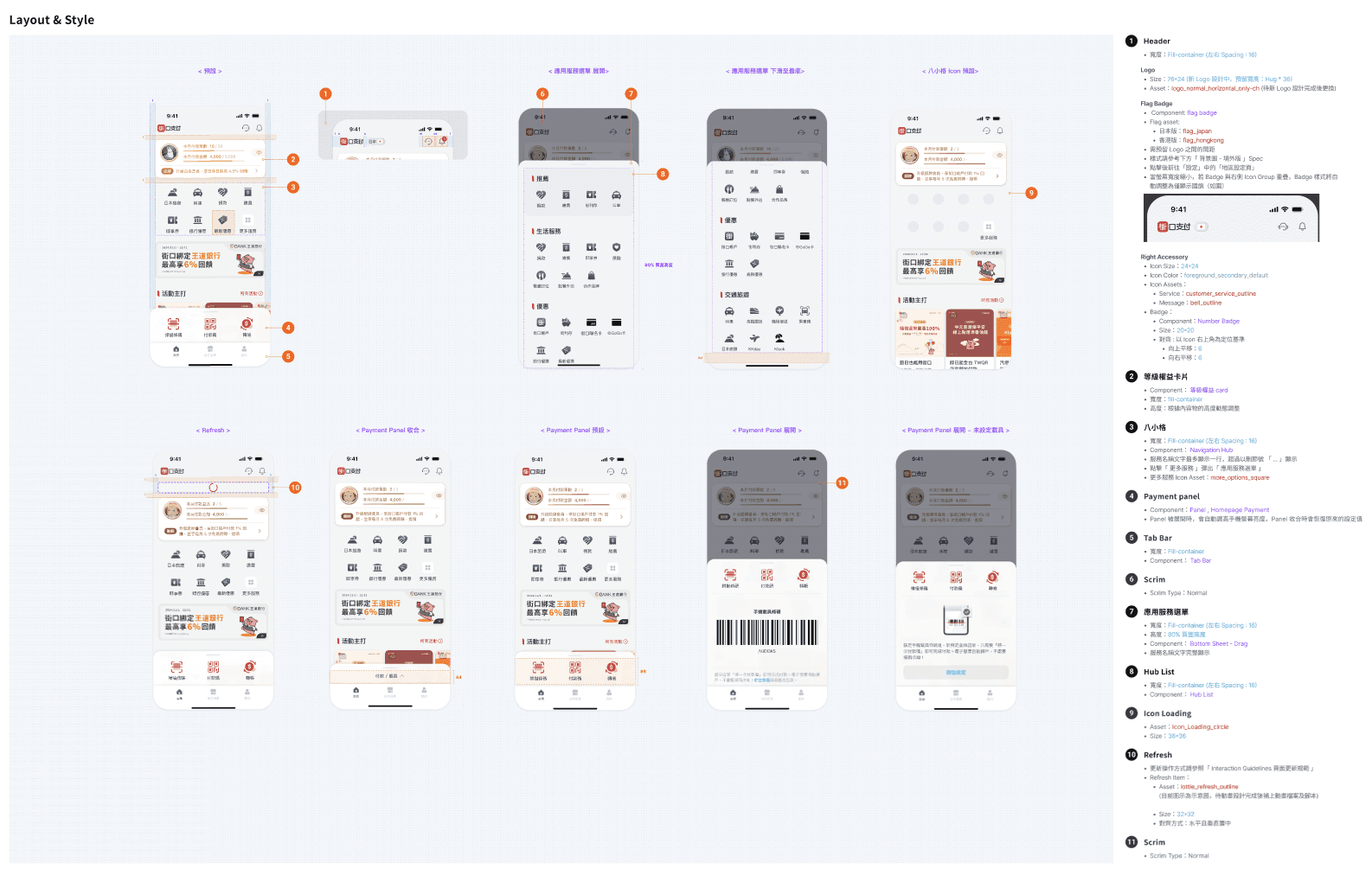
Design Documents
Design Documents
Documented component behavior, interactions, and animations to align design with development and ensure high-quality implementation
Documented component behavior, interactions, and animations to align design with development and ensure high-quality implementation
專案成果
專案成果
Six months after launch, click-through rates on all three core transaction functions grew significantly:
Six months after launch, click-through rates on all three core transaction functions grew significantly:
Six months after launch, click-through rates on all three core transaction functions grew significantly:
The panel improved core transaction accessibility through consolidation, rather than sacrificing it
Transfer
Transfer
67%
67%
Show payment barcode
Show payment barcode
50%
50%
Scan QR code
Scan QR code
35%
35%
Show carrier barcode
Show carrier barcode
+2%
+2%
Quantitative
Quantitative
Quantitative
In-app feedback
In-app feedback
"More convenient and flexible"
"More convenient and flexible"
Qualitative
Qualitative
Qualitative
Learnings & Reflections
Learnings & Reflections
Multi-goal interfaces: break down goals before assigning visual weight
Multi-goal interfaces: break down goals before assigning visual weight
The homepage had to carry both membership tier visibility and three core transactions features. Visual weight followed each goal: membership needs to be seen, transactions need to be used quickly.
The homepage had to carry both membership tier visibility and three core transactions features. Visual weight followed each goal: membership needs to be seen, transactions need to be used quickly.
Major IA changes require transitional design
Major IA changes require transitional design
60% of users couldn't find the carrier barcode is predictable in hindsight, since muscle memory takes time to rebuild. My blind spot was scoping the design to "is the new architecture usable," without treating the transition from the old one as part of the problem. Onboarding isn't a post-test patch; it's a design moment to plan alongside any major IA shift.
60% of users couldn't find the carrier barcode is predictable in hindsight, since muscle memory takes time to rebuild. My blind spot was scoping the design to "is the new architecture usable," without treating the transition from the old one as part of the problem. Onboarding isn't a post-test patch; it's a design moment to plan alongside any major IA shift.
( OTHER PROJECTS )
( OTHER PROJECTS )
( OTHER PROJECTS )
LET’S
( WORK )
TOGETHER
If you like my work,
feel free to contact me!
LET’S
( WORK )
TOGETHER
If you like my work,
feel free to contact me!
LET’S
( WORK )
TOGETHER
If you like my work,
feel free to contact me!